■ 객체
1. 객체 생성
2. 메소드
3. 객체 속성 추가 및 삭제
4. 객체 배열
5. 생성자 함수
- new 연산자와 함께 호출되어 객체 생성하는 함수
- this 키워드 사용해서 생성자 함수로 생성되는 객체 프로퍼티 생성할 수 있음
- 생성자 함수 첫 글자는 대문자로 작성함
function Student (name, java, oracle) {
    // 속성 정의 (프로퍼티 정의)
    this.name = name;
    this.java = java;
    this.oracle = oracle;
}

Student.prototype.getSum = function() {
    return this.java + this.oracle;
};

Student.prototype.getAvg = function() {
    return this.getSum() / 2;
}

let btn5 = document.getElementById('btn5');

btn5.addEventListener('click', function(){
    let div5 = document.getElementById('div5');
    let student = new Student('성춘향', 80, 80);
    let students = [];

    students.push(student);
    students.push(new Student('홍길동', 60, 60));
    students.push(new Student('이몽룡', 50, 50));
    students.push(new Student('백구', 90, 90));

	// obj instanceof class -> obj가 class에 속하면 true 반환
    console.log(student instanceof Student);

    // 모든 학생의 정보를 출력(이름, 총점, 평균)
    for (const element of students) {
        div5.innerHTML += `이름: ${element.name}, 총점: ${element.getSum()}, 평균: ${element.getAvg()}<br>`;
    }
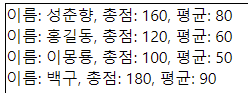
});
6. 캡슐화
- new 연산자와 함께 호출되어 객체 생성하는 함수
- this 키워드 사용해서 생성자 함수로 생성되는 객체 프로퍼티 생성할 수 있음
function IdolGroup(n, m) {
    let name = n;
    let members = m;

    this.getGroupName = function() {
        return name;
    }

    this.getMembers = function() {
        return members;
    }

    this.getMemberCount = function() {
        return members.length;
    }

    this.setGroupName = function(n) {
        name = n;
    }

    this.setMembers = function(m) {
        members = m;
    }
}

let btn6 = document.getElementById('btn6');

btn6.addEventListener('click', function() { // 지역변수랑 클로저 통해서 캡슐화 구현하는 방법
    let div6 = document.getElementById('div6');

    let idol = new IdolGroup('BTS', ['정국','진','뷔','슈가','랩몬','제이홉','지민']);

    console.log(idol);

    idol.setGroupName('레드벨벳');
    idol.setMembers(['슬기', '조이', '웬디', '아이린', '예리']);

    div6.innerHTML = `그룹명: ${idol.getGroupName()}, 멤버: ${idol.getMembers()}, 멤버수: ${idol.getMemberCount()}명`;
});
7. Date 객체
- new 연산자와 함께 호출되어 객체 생성하는 함수
- this 키워드 사용해서 생성자 함수로 생성되는 객체 프로퍼티 생성할 수 있음
■ BOM
- 브라우저 관련된 객체들
- BrowserObjectModel
1. window 객체
- 브라우저 창 설정하는 최상위 객체
1) window.open()
2) 타이머(Timer)
- window.setTimeout() : 일정 시간이 경과된 이후에 매개값으로 전달된 콜백 함수를 한 번만 실행
- window.setInterval() : 일정 시간이 경과된 이후에 매개값으로 전달된 콜백 함수를 반복해서 실행
2. location 객체
- 브라우저 표시줄(UML) 관련 객체
1) location.reload() : 페이지 새로 고침 메소드
2) location.assign() : 페이지 이동 시킴(history 기록됨, 뒤로가기 가능)
3) location.replae() : 페이지 이동 시킴(history 기록 안됨, 뒤로가기 불가능)
<button onclick="location.reload()">새로고침</button>
<button onclick="location.href=location.href">새로고침</button>
<button onclick="location=location">새로고침</button>

<button onclick="location.href='https://www.google.com'">구글로 이동</button>
<button onclick="location.assign('https://www.google.com')">구글로 이동</button>
<!--구글로 이동 후 뒤로가기 없어짐.
현 페이지를 다른 페이지로 덮어쓴다.
로그아웃 후 뒤로가기 못하게 할 때 사용-->
<button onclick="location.replace('https://www.google.com')">구글로 이동</button>
3.history 객체
- 브라우저에서의 이동 문서 내역 관리하는 객체
<button onclick="history.back();">back</button> <!-- 뒤로가기 -->
<button onclick="history.forward();">forword</button> <!-- 앞으로 가기 -->
<button onclick="history.go(-1);">go(-1)</button> <!-- 1페이지 뒤로가기 -->
<button onclick="history.go(1);">go(1)</button> <!-- 1페이지 앞으로 가기 -->'국비과정 > Frontend' 카테고리의 다른 글
| 국비 61일차 - [jQuery] 개요, 기본선택자, 추가선택자, filtering 메소드 (0) | 2022.06.24 |
|---|---|
| 국비 60일차 - [Javascript] DOM, 이벤트, 정규 표현식 (0) | 2022.06.22 |
| 국비 58일차 - [Javascript] 함수(선언, 호출,리턴, 내장 함수), 객체(생성, 메소드, 속성 추가 및 삭제, 배열) (0) | 2022.06.20 |
| 국비 57일차 - [Javascript] 데이터 형변환, 연산자, 제어문, 배열 (0) | 2022.06.17 |
| 국비 56일차 - [Javascript] 기본 문법 (0) | 2022.06.16 |
댓글