■ jQuery 개요
- 존 레식에 의해 개발된 오픈 소스 기반의 JavaScript 라이브러리
- Document Object Model
- HTML DOM, CSS 스타일, AJAX 애플리케이션 쉽게 구현 가능
1. jQuery 적용
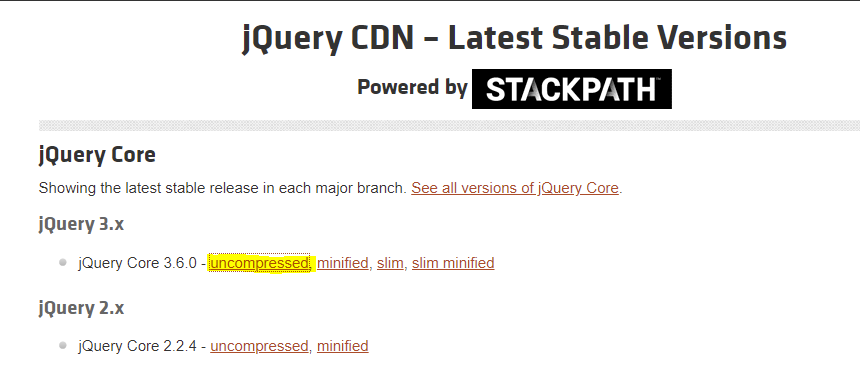
1) CND(Content Delivery Network) 통한 다운로드
2) jQuery 홈페이지에서 jQuery 라이브러리 다운로드
//CDN 이용
<script src="https://code.jquery.com/jquery-3.6.0.js" ></script>

// jQuery 다운로드
<script src="jquery-3.6.0.js" ></script>
2. jQuery 시작
- ready 메소드 통해 웹 문서 모든 요소 로드 후 실행되어야 함
- $ 또는 jQuery 식별자를 통해 접근 가능('$()' 대신 'jQuery()' 로 작성 가능)
$(document).ready(function(){
  // 실행 코드
});

// 축약형
$(function(){
  // 실행 코드
});
■ 기본 선택자
-태그(요소) 선택자, 아이디 선택자, 클래스 선택자
// 1. 태그 선택자
$('h5').css('color', 'blue');
$('p, h5').css('background-color', 'yellow');

// 2. 아이디 선택자
$('#id2').css('color', 'hotpink');

// 3. 클래스 선택자
$('.item').css({'color': 'orange', 'background-color': 'yellow'});
■ 추가 선택자
1. 자손 선택자(>), 후손 선택자(한 칸 공백)
- 자손 : 바로 아래 자식
- 후손 : 자식의 자식
// 자손 선택자
$('div>ul>li').css('color', 'violet');

// 후손 선택자
$('div h3').css('background-color', 'skyblue');
$('div .ch').css('background-color', 'tomato');
2. 속성 선택자
$('input[class]').css('background-color', 'tomato');
$('input[type=text]').val('Change Value');
$('input[type^=ra]').prop('checked', true);
3. 입력 양식 선택자
$(':button').val('왕버튼').css({'width': '100px', 'height':'100px'});

// 사진 위에 마우스 올리면 다른 사진으로 변경하기
$(':image').hover(
    function() {
        // 마우스가 요소 내부로 들어왔을 때 이벤트 처리
        $(this).attr('src', '../resources/image/flower1.PNG');
    },
    function() {
        // 마우스가 요소 외부로 나갔을 때 이벤트 처리
        $(this).attr('src', '../resources/image/flower2.PNG');
    }
);
* attr() : 요소의 속성값을 가져오거나 추가
4. 입력 양식 상태에 대한 선택자
// 1) input 태그 중에 활성화된 객체 선택
$('input:enabled').css('background-color', 'yellow');

// 2) input 태그 중에 비활성화된 객체 선택
$('input:disabled').css('background-color', 'tomato');

// 3) input 태그 중에 체크된 객체 선택
$('input:checked').css({'width': '20px', 'height':'20px'});

// 4) checkbox에 change 이벤트 핸들러 등록
$('input:checkbox').change(function() {
    let checkbox = $(this);

    if(checkbox.prop('checked')){
        checkbox.css({'width': '50px', 'height':'50px'});
    } else {
        checkbox.css({'width': '20px', 'height':'20px'});
    }
});

// 5) selcet change 이벤트 핸들러 등록
$('#national').change(function(){
    let value = $('#national>option:selected').val();
    $('#result1').val(value);
});
■ 객체 탐색
1. filtering 메소드 : 선택자로 지정한 객체 그룹에서 위치를 가지고 객체를 선택하는 메소드
- $('선택자').first() : 선택된 요소들 중 첫 번째 요소 리턴
- $('선택자').last() : 선택된 요소들 중 마지막 요소 리턴
- $('선택자').eq(인덱스 번호) : 선택된 요소들 중 인덱스 번호와 일치하는 요소 리턴(인텍스 0부터 시작!)
- $('선택자').odd() : 선택된 요소들 중 홀수 인덱스 요소들 리턴
- $('선택자').even() : 선택된 요소들 중 짝수 인덱스 요소들 리턴
- $('선택자').filter('선택자') : 선택된 요소들 중 인자 값과 일치하는 요소 리턴
- $('선택자').not('선택자') : 선택된 요소들 중 인자 값과 일치하지 않는 요소들 리턴
- $('선택자').is('선택자') : 선택된 요소들 중 인자 값과 일치는 요소 있는지 확인 (true, false 리턴)
$('h4').first().css("font-size", '2em'); // 필터 관련 메소드
$('h4:first').css("font-size", '2em'); // 필터 관련 선택자(위와 결과 동일)
$('h4').last().css("font-size", '2em');
$('h4').eq(4).text('선택되었습니다.'); // 5번째 요소 리턴(인덱스 번호가 4번이니까)
$('.test:odd').css({'background-color': 'tomato', 'color': 'white'});

$('.test').filter(function(index) {
    return index % 2 == 0;
}).css({'background-color': 'orange', 'color': 'white'});

$('h4').not('.test').css({'background-color': 'pink', 'color': 'green'});
■ 기타
1. html 문서에 script 작성 순서
- 제이쿼리 script 먼저, 그 다음 외부 script
- 순서 바뀌면 에러 발생함
(외부.js 파일의 $를 실행하려고 하는데 jQuery 라이브러리가 아직 없기 때문)
<script src="./js/jquery-3.6.0.min.js"></script>
<script src="./02_기본선택자.js"></script>
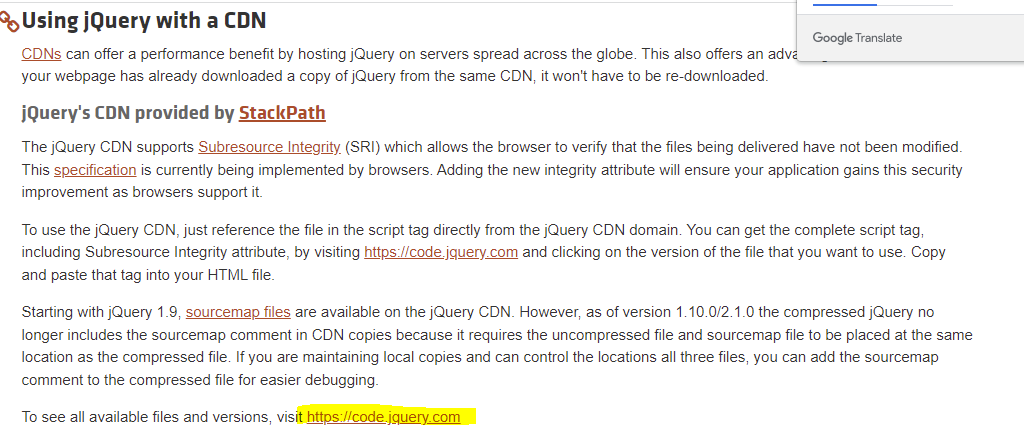
2. jQuery 라이브러리 다운로드 방법
- https://jquery.com/download/
'국비과정 > Frontend' 카테고리의 다른 글
| 국비 63일차 - [jQuery] 이벤트, 효과 (0) | 2022.06.27 |
|---|---|
| 국비 62일차 - [jQuery] Ancestors, Descendants, Sideways 메소드, 객체 조작 (0) | 2022.06.24 |
| 국비 60일차 - [Javascript] DOM, 이벤트, 정규 표현식 (0) | 2022.06.22 |
| 국비 59일차 - [Javascript] 객체(생성자 함수, 캡슐화, Date), BOM(window, location, history) (0) | 2022.06.21 |
| 국비 58일차 - [Javascript] 함수(선언, 호출,리턴, 내장 함수), 객체(생성, 메소드, 속성 추가 및 삭제, 배열) (0) | 2022.06.20 |
댓글